
How to Join an Organization
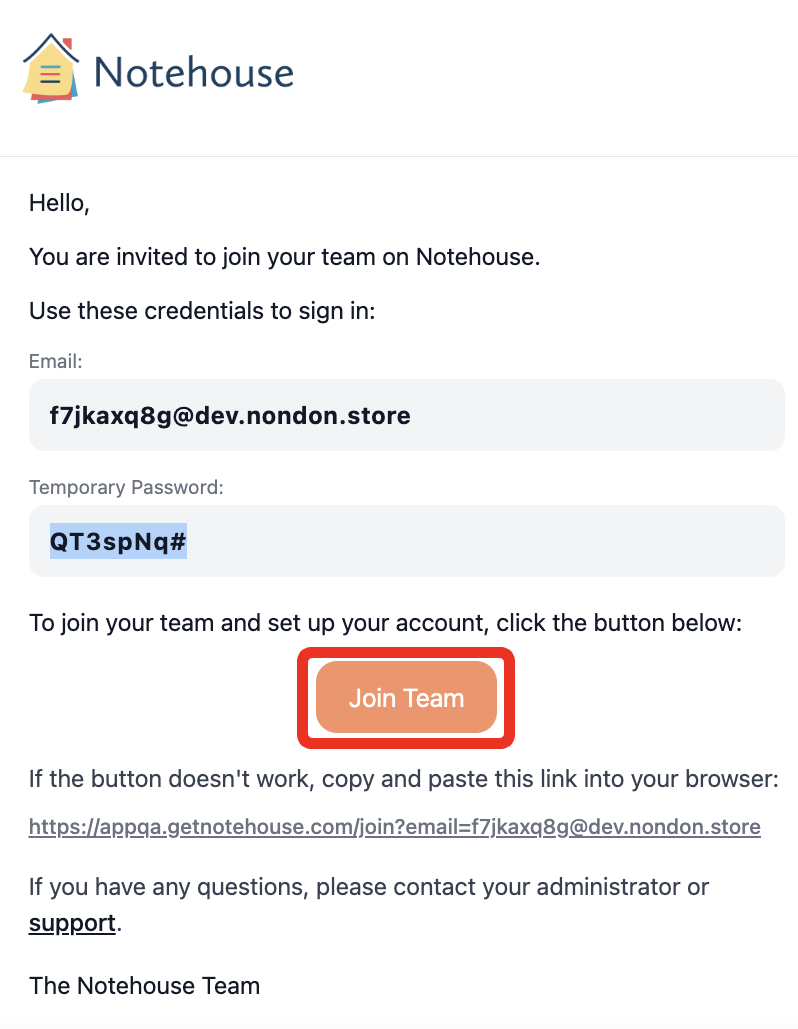
When a colleague invites you to their Notehouse organization, you’ll receive an invitation email with a Join Team button.
Use this invitation email to complete your setup. Do not sign up for a separate individual account if you are trying to join an existing organization.
Once setup is complete, you can log in and begin working with your assigned clients based on the role and permissions set by your Administrator or Owner.
Table of Contents
Important: Do Not Create a Separate Account
If you are trying to join an existing Notehouse organization, do not sign up for a separate individual account.
You must use the link in the invitation email sent by your Administrator or Owner to join your organization. This connects your login to the correct organization, billing setup, role permissions, and clients.
Creating your own individual account before you are invited to join your team will prevent your Administrator or Owner from inviting you to the correct organization with that same email address. If this happens, the individual account must be deleted before you can be invited to join the organization.
Joining Your Team
- Open the invitation link by clicking on Join Team or by copying and pasting the link provided in the email into your browser.
- Once you open the Join Team link in your browser, enter the temporary password from the email you received.
- Create a new password with at least 8 characters, including upper and lowercase letters, a number, and a special character.
- Confirm your password and accept the Terms of Service.

After setting up your new password, you will be redirected to the login page. Your account setup is now complete. Log in using your email address and new password.
If 2-Factor Authentication is required by your organization, you may be asked to choose a verification method, such as an authenticator app or SMS.
Troubleshooting
If you’re having trouble joining an organization after being invited, please note the following:
1. Temporary Passwords Expire.
Temporary passwords expire after 7 days. They also only work in the flow after clicking the Join Team button in your invitation email.
If your temporary password is not working, ask your Administrator or Owner to cancel the pending invitation and send a new one. See Managing Invitations if you are an Administrator or the Owner. Once you receive the new invitation, use the most recent email you receive to complete setup.
2. I Tried Using the Temporary Password on the Regular Log In Page
The temporary setup password cannot be used on the regular Log In page.
To join your organization, go back to your invitation email and click Join Team. Use the temporary setup password there to verify your account and create your own password.
After setup is complete, you can log in normally using your email address and the new password you created. You cannot log in to Notehouse until you fully set up and verify your account following the flow as outlined above.
3. “Forgot Password” is Not Working
If you have not completed setup through the invitation email, your account is not fully active yet and you do not have a confirmed password or email in our systems yet.
Verifying your account to join your organization is different from logging in. Attempting to reset your password before setup is complete may prevent you from accessing the account.
4. I Need a New Invitation
If you need a new invitation to join your team, please contact an Admin or Owner within your organization. Organization invitations must be sent and managed by your organization’s Admins or Owners.
Notehouse Support is not able to send organization invitations on behalf of your team, as invitations affect account access, user roles, permissions, and billing.
If your Admin or Owner runs into an issue or error sending the invitation, they can contact Notehouse Support for assistance.
5. I Created My Own Account and Can’t Join My Organization
If you signed up for your own individual Notehouse account instead of using your organization invitation, your email address is already connected to a separate account.
To join your organization, the individual account must be deleted first. After the account has been deleted, your Administrator or Owner can send you a new invitation.
Do not create another account. Wait for the new invitation email and complete setup using the Join Team button, following the flow as outlined above.
If you cannot delete your organization or account, please reach out to support@getnotehouse.com for assistance. This process requires support from our technical team and may take several business days to resolve. Until this is complete, there may be a delay in your ability to join the correct organization.
For questions, contact us at support@getnotehouse.com.