
Transferring Account Ownership
The Owner role includes billing access, compliance agreements, and full administrative control.
Transferring ownership is a significant change. Once completed, it can only be reversed by the new Owner, so be sure you’re transferring to the right person.
Table of Contents
- About Account Ownership
- Who Can Transfer Ownership?
- Transfer Process
- What If the New Owner is Not a User Under My Notehouse Account?
- After Transfer
- Important Note
About Account Ownership
Each Notehouse organization has one Owner. This role is created when the organization is first set up and includes exclusive access to:
- Billing and subscription management
- Compliance agreements, including the BAA
- Transferring account ownership
- Full administrative control
Who Can Transfer Ownership?
Only the current Owner can initiate an ownership transfer.
Admins cannot transfer ownership, but ownership can be transferred to an Admin. You cannot transfer ownership to yourself. The new owner must already be an existing team member.
If your Owner is no longer with the organization and you cannot access their account, contact us at support@getnotehouse.com for help with transferring account ownership.
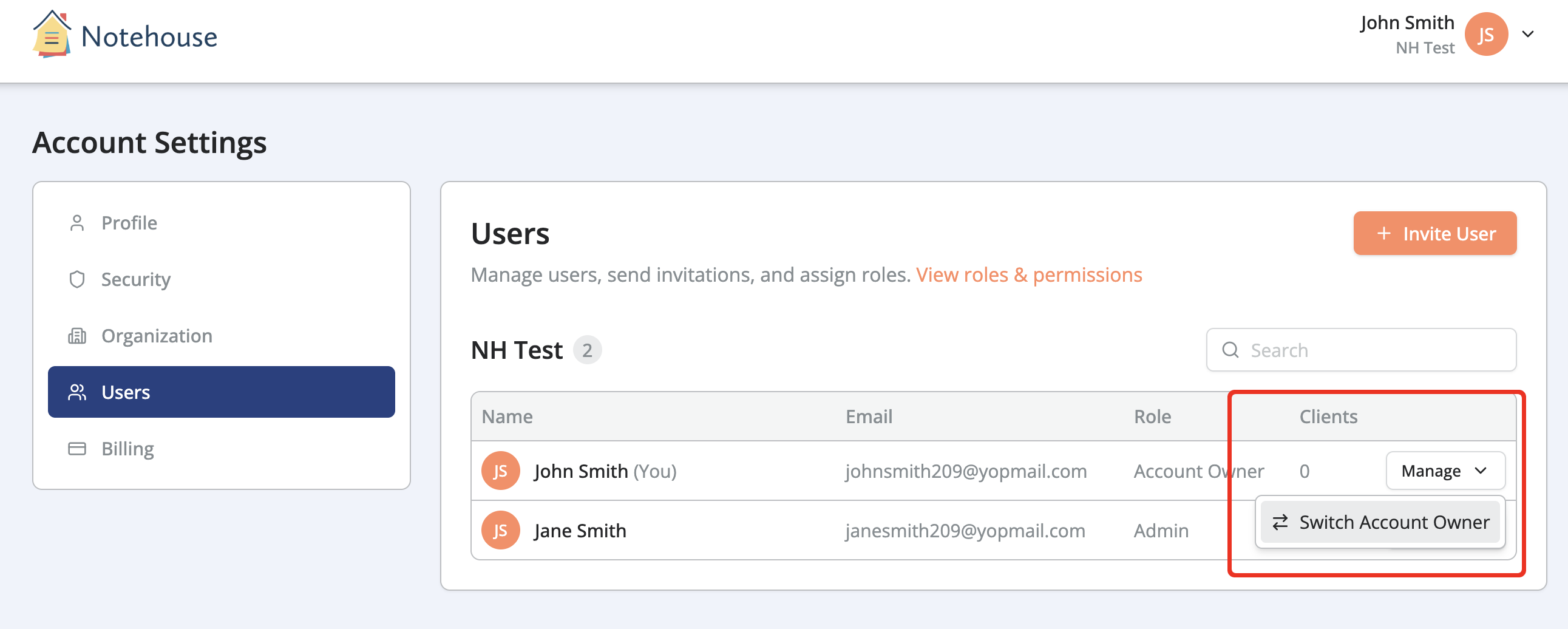
Transfer Process
- Log in as the Owner
- Go to Account Settings
- Open the Users tab
- Click Manage for the Owner
- Select Switch Account Owner
- Select the new Owner from your Organization's users
- Review the confirmation message
-
Confirm the transfer
The new owner must be an active, verified user in your organization.
What If the New Owner is Not a User Under My Notehouse Account?
The new Owner must be added as a new user. After the new Owner has joined your Organization, you can transfer Account Ownership to them.
See How to Add a Team Member for more information.
To avoid being billed for users who are no longer on your team, remove the previous Owner if they no longer need access after ownership is transferred.
After Transfer
For the New Owner
- Gains ownership immediately
- Receives full billing and compliance access
- Becomes responsible for organizational administration
- Cannot be removed by other users
For the Previous Owner
- Is downgraded to an Admin role
- Retains general administrative access
- Loses billing and ownership-specific permissions
You can also remove the previous Owner from the organization if needed. Before removal, reassign any clients they manage to another active user and export or retain any data your organization needs.
For the Organization
- No disruption to users or data
- Clients, settings, and history remain unchanged
- Billing continues without interruption
Important Note
Ownership transfers must be completed directly by the current Owner while they still have access to their account. Notehouse support cannot transfer ownership on behalf of an active Owner, except in cases involving technical issues or system errors.
Support can assist when the Owner has left the organization and no one can log in to their account. Please contact us at support@getnotehouse.com if this is the case.
For questions, contact us at support@getnotehouse.com.