
How to Send Feedback in Notehouse
We welcome feedback from our users. Share feature ideas, usability feedback, or anything that would make Notehouse work better for your team.
The fastest way to send product feedback is directly from inside Notehouse.
Table of Contents
- Using the Built-in Feedback
- When Should I Send Feedback?
- Important: Do Not Use Send Feedback for Support Requests
Using the Built-In Feedback
Notehouse has a built-in feedback option that sends your message directly to our team.
- In the top-right corner of Notehouse, click the dropdown arrow next to your name
- Select Send feedback
-
Write your message and submit
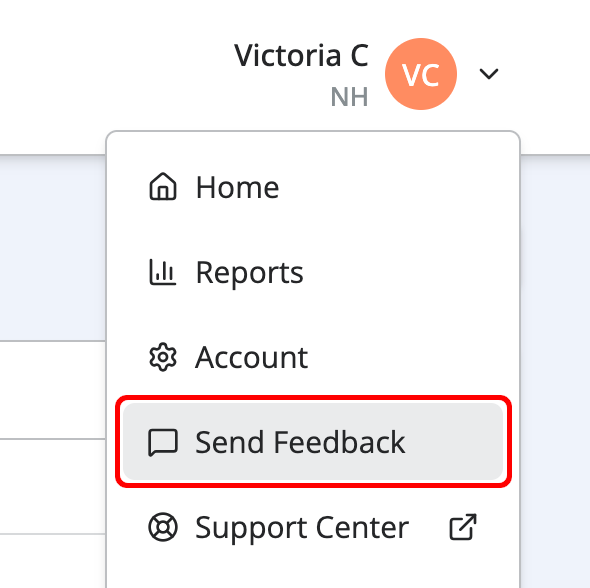
Your feedback is sent directly to our team.
When Should I Use Send Feedback?
This option is perfect for:
- Feature requests or ideas
- Usability feedback
- Suggestions for improving workflows
- Product feedback you’d like our team to review
Important: Do Not Use Send Feedback for Support Requests
The Send Feedback option is not a support channel and is not monitored as part of our support inbox.
Do not use Send Feedback for account issues, billing questions, login problems, technical errors, or time-sensitive requests. Messages sent through Send Feedback for support-related issues will be missed and may not receive a response.
Contact support at support@getnotehouse.com for timely help.
For help with Notehouse, contact support directly at support@getnotehouse.com.